Android + Arduino + USB Host + Temperature + Light
May 2nd, 2012 by michael
0
This worked for me.
Sensing temperature and light with Android and Arduino. This article will demonstrate a basic thermometer / ambient light level detection input accessory.
For additional background information on interfacing Android with the real world, check out my other introductory tutorials:
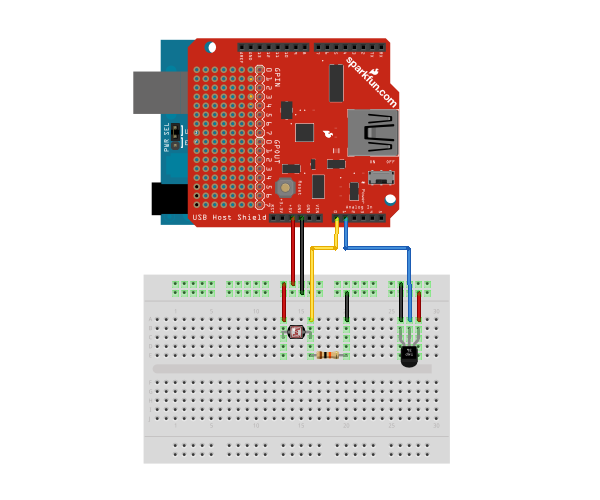
Connect one of the photocell leads to 5v and the other to analog input pin A0. Also connect the same lead through a 10K resistor to ground. In hardware, this concept is known as a voltage divider. Then connect the ground and power leads of the TMP36 to, you guessed it, ground and 5V. Finally, connect the signal lead of the TMP36 to analog input pin A1. Here is a diagram of the completed circuit (created with Fritzing):
Software
Arduino Firmware
Next, upload the Arduino sketch to the microcontroller. The sketch uses the Microbridge implementation by Niels Brouwers. Microbridge uses Android Debug Bridge (ABD) forwarding over TCP, rather than the Google Android ADK. You can checkout the source for the Arduino sketch from Github, or just copy and paste the following into the Arduino IDE.
Android App
The next step is to install the Android Demo application onto the device. You can either download the pre-built .apk or checkout the source from Github:
Finally upload the app to the device (or browse to this page on the device and download the apk above). Connect the Android device to the USB Host board/shield, and start up the app.
[...] ambient light detection device is the subject of build in this case. This is constructed using an [...]
david demambro:
August 19th, 2012 at 12:31 pm
Awesome, works great. Thanks, for this tutorial.
RBT:
September 20th, 2012 at 3:40 pm
Hi this sketch when I go to my board tell me these errors occurred:
sketch_sep20a:20: error: stray ‘\’ in program
sketch_sep20a:21: error: stray ‘\’ in program
sketch_sep20a:26: error: stray ‘\’ in program
sketch_sep20a:32: error: stray ‘\’ in program
sketch_sep20a:0: error: variable or field ‘adbEventHandler’ declared void
sketch_sep20a:0: error: ‘Connection’ was not declared in this scope
sketch_sep20a:0: error: ‘connection’ was not declared in this scope
sketch_sep20a:0: error: expected primary-expression before ‘event’
sketch_sep20a:0: error: expected primary-expression before ‘length’
sketch_sep20a:0: error: expected primary-expression before ‘*’ token
sketch_sep20a:0: error: ‘data’ was not declared in this scope
sketch_sep20a:4: error: expected constructor, destructor, or type conversion before ‘*’ token
sketch_sep20a:8: error: variable or field ‘adbEventHandler’ declared void
sketch_sep20a:8: error: ‘Connection’ was not declared in this scope
sketch_sep20a:8: error: ‘connection’ was not declared in this scope
sketch_sep20a:8: error: expected primary-expression before ‘event’
sketch_sep20a:8: error: expected primary-expression before ‘length’
sketch_sep20a:8: error: expected primary-expression before ‘*’ token
sketch_sep20a:8: error: ‘data’ was not declared in this scope
sketch_sep20a.cpp: In function ‘void setup()’:
sketch_sep20a:18: error: ‘ADB’ has not been declared
sketch_sep20a:20: error: ‘connection’ was not declared in this scope
sketch_sep20a:20: error: ‘ADB’ has not been declared
sketch_sep20a:20: error: ‘u201ctcp’ was not declared in this scope
sketch_sep20a:20: error: ‘adbEventHandler’ was not declared in this scope
sketch_sep20a:21: error: ‘u201cReady’ was not declared in this scope
sketch_sep20a.cpp: In function ‘void loop()’:
sketch_sep20a:26: error: expected `)’ before ‘u2013′
sketch_sep20a:45: error: expected `)’ before ‘ADB’
How can I fix this?
[...] a shiny new Android phone and are looking for a fun project to try out, you might want to check out this simple Arduino exercise that [Mike Mitchel] put together. Everyone needs a starting off point for hacking, and [Mike] [...]
Copying and pasting the code directly from the website seemed to grab extra characters, so I have enclosed it within a github gist. It should now work correctly without stray ‘\’s now.
That was indeed the issue, thanks for pointing out the easy fix!
RBT:
October 31st, 2012 at 11:44 am
Thanks, but I submit this sketch in the Arduino 1.0 and it found an error that say: Desktop\arduino-1.0s\libraries\Adb/Adb.h:20:20: error: wiring.h: No such file or directory, What can I do?
You need to replace any occurence of
#include wiring.h to Arduino.h in all *.h and *.cpp files.
RBT:
October 31st, 2012 at 12:22 pm
I change the first name;
#include
#include
// Adb connection.
Connection * connection;
// Elapsed time for sensor sampling
long lastTime;
// Event handler for shell connection; called whenever data sent from Android to Microcontroller
void adbEventHandler(Connection * connection, adb_eventType event, uint16_t length, uint8_t * data)
{
// Unused in this case
}
void setup()
{
Serial.begin(57600);
// Record time for sensor polling timer
lastTime = millis();
// Init the ADB subsystem.
ADB::init();
// Open an ADB stream to the phone’s shell. Auto-reconnect. Use port number 4568
connection = ADB::addConnection(“tcp:4568″, true, adbEventHandler);
Serial.println(“Ready!”);
}
void loop()
{
//Check if sensor should be sampled.
if ((millis() – lastTime) > 20)
{
uint16_t data[2];
// light sensor
data[0] = analogRead(A0);
float celsius = getVoltage(1); //getting the voltage reading from the temp sensor
celsius = (celsius – .5) * 100; //converting from 10 mv per degree wit 500 mV offset
//to degrees ((volatge – 500mV) times 100)
float fahrenheit = (celsius * (9.0 / 5.0)) + 32.0;
data[1] = (int) fahrenheit;
//Send the sensor value to Android as 4 bytes of data.
connection->write(sizeof(data),(uint8_t*)&data);
// Output debugging to serial
Serial.println(data[0],DEC);
Serial.println(data[1],DEC);
// Update timer for sensor check
lastTime = millis();
}
// Poll the ADB subsystem.
ADB::poll();
}
float getVoltage(int pin){
return (analogRead(pin) * .004882814); //converting from a 0 to 1024 digital range
// to 0 to 5 volts (each 1 reading equals ~ 5 millivolts
}
RBT:
October 31st, 2012 at 12:23 pm
#include
#include
// Adb connection.
Connection * connection;
// Elapsed time for sensor sampling
long lastTime;
// Event handler for shell connection; called whenever data sent from Android to Microcontroller
void adbEventHandler(Connection * connection, adb_eventType event, uint16_t length, uint8_t * data)
{
// Unused in this case
}
void setup()
{
Serial.begin(57600);
// Record time for sensor polling timer
lastTime = millis();
// Init the ADB subsystem.
ADB::init();
// Open an ADB stream to the phone’s shell. Auto-reconnect. Use port number 4568
connection = ADB::addConnection(“tcp:4568″, true, adbEventHandler);
Serial.println(“Ready!”);
}
void loop()
{
//Check if sensor should be sampled.
if ((millis() – lastTime) > 20)
{
uint16_t data[2];
// light sensor
data[0] = analogRead(A0);
float celsius = getVoltage(1); //getting the voltage reading from the temp sensor
celsius = (celsius – .5) * 100; //converting from 10 mv per degree wit 500 mV offset
//to degrees ((volatge – 500mV) times 100)
float fahrenheit = (celsius * (9.0 / 5.0)) + 32.0;
data[1] = (int) fahrenheit;
//Send the sensor value to Android as 4 bytes of data.
connection->write(sizeof(data),(uint8_t*)&data);
// Output debugging to serial
Serial.println(data[0],DEC);
Serial.println(data[1],DEC);
// Update timer for sensor check
lastTime = millis();
}
// Poll the ADB subsystem.
ADB::poll();
}
float getVoltage(int pin){
return (analogRead(pin) * .004882814); //converting from a 0 to 1024 digital range
// to 0 to 5 volts (each 1 reading equals ~ 5 millivolts
}
RBT:
October 31st, 2012 at 12:27 pm
Please, could you pass me the good sketch? because I don´t understand, that I have change in the sketch.
I’m sorry but my first post was cut by editor.
The last version of Arduino compiler use the file “Arduino.h” instead of “wiring.h” and wProgram.h files,so you need to substitute the line “#include wiring.h” and “#include wProgram.h” with the line “#include Arduino.h” in all occurrence of your sketch and in the other librarys used(file with .h and .cpp extension), if receive more error. Anyway you can see the error description at the bottom of the compiler window.
That is correct! This is an issue in the Arduino IDE 1.0+ (the article was written with 022 IDE). To fix the problem you will need to change the include statements in the Adb library, or others referenced (NOT in the sketch). This is located in the following files (which should be located in /path/to/sketchbook/libraries/): Adb.h, usb.cpp, and max3421e.cpp
Change the each instance of: #include "wiring.h" and #include "wProgram.h"
to #include "Arduino.h"
in those files. If any others present an error in the compiler output at the bottom of the Arduino IDE when you compile, you will need to update those as well.
RBT:
November 4th, 2012 at 5:32 pm
Thanks Michael, I submit the sketch in my board arduino mega adk, but when I connect the mobile phone Xperia Tipo in the board, the board not send the temperature and the light, also I istalled the app in my mobile. What can I do?
Do you have USB debugging enabled on your Android device? On the device, go to Settings > Applications > Development and enable USB debugging (on an Android 4.0+ device, the setting is located in Settings > Developer options). Is there sufficient power to the board/device? Certain USB Host boards, such as this one from Sparkfun requires VIN on the Arduino, and cannot be powered directly through the USB port. It may also be beneficial to attempt it with a fully charged battery on the Android device, so it is not pulling too much current for the Arduino/USB Host to function correctly.
[...] Android + Arduino + USB Host + Temperature + Light | MitchTech. Share this:TwitterFacebookLike this:LikeBe the first to like this. [...]
andre:
March 15th, 2013 at 2:32 pm
What kind of usb host shield here Im using usb host shield 2.0. is my usb shield compatible with this program?
Patrick Hochleitner:
April 7th, 2013 at 6:50 pm
Hey could you explain to me why is it always required to do a voltage divider with the photo resistance? Its not the first time I see though I dont quite understand why do we need it.
Light Detection Device Using Arduino | HACKOLOG - Amazing Hacks and Mods:
May 10th, 2012 at 1:01 pm
[...] ambient light detection device is the subject of build in this case. This is constructed using an [...]
david demambro:
August 19th, 2012 at 12:31 pm
Awesome, works great. Thanks, for this tutorial.
RBT:
September 20th, 2012 at 3:40 pm
Hi this sketch when I go to my board tell me these errors occurred:
sketch_sep20a:20: error: stray ‘\’ in program
sketch_sep20a:21: error: stray ‘\’ in program
sketch_sep20a:26: error: stray ‘\’ in program
sketch_sep20a:32: error: stray ‘\’ in program
sketch_sep20a:0: error: variable or field ‘adbEventHandler’ declared void
sketch_sep20a:0: error: ‘Connection’ was not declared in this scope
sketch_sep20a:0: error: ‘connection’ was not declared in this scope
sketch_sep20a:0: error: expected primary-expression before ‘event’
sketch_sep20a:0: error: expected primary-expression before ‘length’
sketch_sep20a:0: error: expected primary-expression before ‘*’ token
sketch_sep20a:0: error: ‘data’ was not declared in this scope
sketch_sep20a:4: error: expected constructor, destructor, or type conversion before ‘*’ token
sketch_sep20a:8: error: variable or field ‘adbEventHandler’ declared void
sketch_sep20a:8: error: ‘Connection’ was not declared in this scope
sketch_sep20a:8: error: ‘connection’ was not declared in this scope
sketch_sep20a:8: error: expected primary-expression before ‘event’
sketch_sep20a:8: error: expected primary-expression before ‘length’
sketch_sep20a:8: error: expected primary-expression before ‘*’ token
sketch_sep20a:8: error: ‘data’ was not declared in this scope
sketch_sep20a.cpp: In function ‘void setup()’:
sketch_sep20a:18: error: ‘ADB’ has not been declared
sketch_sep20a:20: error: ‘connection’ was not declared in this scope
sketch_sep20a:20: error: ‘ADB’ has not been declared
sketch_sep20a:20: error: ‘u201ctcp’ was not declared in this scope
sketch_sep20a:20: error: ‘adbEventHandler’ was not declared in this scope
sketch_sep20a:21: error: ‘u201cReady’ was not declared in this scope
sketch_sep20a.cpp: In function ‘void loop()’:
sketch_sep20a:26: error: expected `)’ before ‘u2013′
sketch_sep20a:45: error: expected `)’ before ‘ADB’
How can I fix this?
A simple project to get you started with the Android ADK / Cooking Hacks Blog:
September 27th, 2012 at 4:33 am
[...] a shiny new Android phone and are looking for a fun project to try out, you might want to check out this simple Arduino exercise that [Mike Mitchel] put together. Everyone needs a starting off point for hacking, and [Mike] [...]
Lemorlenny:
October 18th, 2012 at 7:47 pm
You need to rewrite the entire line where the cursor error enlight, pheraps there some hidden char.
michael:
October 22nd, 2012 at 1:27 pm
Copying and pasting the code directly from the website seemed to grab extra characters, so I have enclosed it within a github gist. It should now work correctly without stray ‘\’s now.
michael:
October 22nd, 2012 at 1:27 pm
That was indeed the issue, thanks for pointing out the easy fix!
RBT:
October 31st, 2012 at 11:44 am
Thanks, but I submit this sketch in the Arduino 1.0 and it found an error that say: Desktop\arduino-1.0s\libraries\Adb/Adb.h:20:20: error: wiring.h: No such file or directory, What can I do?
lemorlenny:
October 31st, 2012 at 12:04 pm
You need to replace any occurence of
#include
with
#include
in *.h and *.cpp files.
RBT:
October 31st, 2012 at 12:08 pm
I don´t understand #iclude in*.h and*.cpp files.
lemorlenny:
October 31st, 2012 at 12:09 pm
This editor have some problems in IE…
I means:
You need to replace any occurence of
#include wiring.h to Arduino.h in all *.h and *.cpp files.
RBT:
October 31st, 2012 at 12:22 pm
I change the first name;
#include
#include
// Adb connection.
Connection * connection;
// Elapsed time for sensor sampling
long lastTime;
// Event handler for shell connection; called whenever data sent from Android to Microcontroller
void adbEventHandler(Connection * connection, adb_eventType event, uint16_t length, uint8_t * data)
{
// Unused in this case
}
void setup()
{
Serial.begin(57600);
// Record time for sensor polling timer
lastTime = millis();
// Init the ADB subsystem.
ADB::init();
// Open an ADB stream to the phone’s shell. Auto-reconnect. Use port number 4568
connection = ADB::addConnection(“tcp:4568″, true, adbEventHandler);
Serial.println(“Ready!”);
}
void loop()
{
//Check if sensor should be sampled.
if ((millis() – lastTime) > 20)
{
uint16_t data[2];
// light sensor
data[0] = analogRead(A0);
float celsius = getVoltage(1); //getting the voltage reading from the temp sensor
celsius = (celsius – .5) * 100; //converting from 10 mv per degree wit 500 mV offset
//to degrees ((volatge – 500mV) times 100)
float fahrenheit = (celsius * (9.0 / 5.0)) + 32.0;
data[1] = (int) fahrenheit;
//Send the sensor value to Android as 4 bytes of data.
connection->write(sizeof(data),(uint8_t*)&data);
// Output debugging to serial
Serial.println(data[0],DEC);
Serial.println(data[1],DEC);
// Update timer for sensor check
lastTime = millis();
}
// Poll the ADB subsystem.
ADB::poll();
}
float getVoltage(int pin){
return (analogRead(pin) * .004882814); //converting from a 0 to 1024 digital range
// to 0 to 5 volts (each 1 reading equals ~ 5 millivolts
}
RBT:
October 31st, 2012 at 12:23 pm
#include
#include
// Adb connection.
Connection * connection;
// Elapsed time for sensor sampling
long lastTime;
// Event handler for shell connection; called whenever data sent from Android to Microcontroller
void adbEventHandler(Connection * connection, adb_eventType event, uint16_t length, uint8_t * data)
{
// Unused in this case
}
void setup()
{
Serial.begin(57600);
// Record time for sensor polling timer
lastTime = millis();
// Init the ADB subsystem.
ADB::init();
// Open an ADB stream to the phone’s shell. Auto-reconnect. Use port number 4568
connection = ADB::addConnection(“tcp:4568″, true, adbEventHandler);
Serial.println(“Ready!”);
}
void loop()
{
//Check if sensor should be sampled.
if ((millis() – lastTime) > 20)
{
uint16_t data[2];
// light sensor
data[0] = analogRead(A0);
float celsius = getVoltage(1); //getting the voltage reading from the temp sensor
celsius = (celsius – .5) * 100; //converting from 10 mv per degree wit 500 mV offset
//to degrees ((volatge – 500mV) times 100)
float fahrenheit = (celsius * (9.0 / 5.0)) + 32.0;
data[1] = (int) fahrenheit;
//Send the sensor value to Android as 4 bytes of data.
connection->write(sizeof(data),(uint8_t*)&data);
// Output debugging to serial
Serial.println(data[0],DEC);
Serial.println(data[1],DEC);
// Update timer for sensor check
lastTime = millis();
}
// Poll the ADB subsystem.
ADB::poll();
}
float getVoltage(int pin){
return (analogRead(pin) * .004882814); //converting from a 0 to 1024 digital range
// to 0 to 5 volts (each 1 reading equals ~ 5 millivolts
}
RBT:
October 31st, 2012 at 12:27 pm
Please, could you pass me the good sketch? because I don´t understand, that I have change in the sketch.
lemorlenny:
October 31st, 2012 at 2:33 pm
I’m sorry but my first post was cut by editor.
The last version of Arduino compiler use the file “Arduino.h” instead of “wiring.h” and wProgram.h files,so you need to substitute the line “#include wiring.h” and “#include wProgram.h” with the line “#include Arduino.h” in all occurrence of your sketch and in the other librarys used(file with .h and .cpp extension), if receive more error. Anyway you can see the error description at the bottom of the compiler window.
michael:
November 4th, 2012 at 3:31 pm
That is correct! This is an issue in the Arduino IDE 1.0+ (the article was written with 022 IDE). To fix the problem you will need to change the include statements in the Adb library, or others referenced (NOT in the sketch). This is located in the following files (which should be located in /path/to/sketchbook/libraries/):
Adb.h, usb.cpp, and max3421e.cppChange the each instance of:
#include "wiring.h"and#include "wProgram.h"to
#include "Arduino.h"in those files. If any others present an error in the compiler output at the bottom of the Arduino IDE when you compile, you will need to update those as well.
RBT:
November 4th, 2012 at 5:32 pm
Thanks Michael, I submit the sketch in my board arduino mega adk, but when I connect the mobile phone Xperia Tipo in the board, the board not send the temperature and the light, also I istalled the app in my mobile. What can I do?
michael:
November 4th, 2012 at 7:26 pm
Do you have USB debugging enabled on your Android device? On the device, go to Settings > Applications > Development and enable USB debugging (on an Android 4.0+ device, the setting is located in Settings > Developer options). Is there sufficient power to the board/device? Certain USB Host boards, such as this one from Sparkfun requires VIN on the Arduino, and cannot be powered directly through the USB port. It may also be beneficial to attempt it with a fully charged battery on the Android device, so it is not pulling too much current for the Arduino/USB Host to function correctly.
Android + Arduino + USB Host + Temperature + Light | MitchTech « Mazurland:
December 20th, 2012 at 4:30 pm
[...] Android + Arduino + USB Host + Temperature + Light | MitchTech. Share this:TwitterFacebookLike this:LikeBe the first to like this. [...]
andre:
March 15th, 2013 at 2:32 pm
What kind of usb host shield here Im using usb host shield 2.0. is my usb shield compatible with this program?
Patrick Hochleitner:
April 7th, 2013 at 6:50 pm
Hey could you explain to me why is it always required to do a voltage divider with the photo resistance? Its not the first time I see though I dont quite understand why do we need it.
sixpath:
May 19th, 2013 at 11:04 pm
can i get your android project(full)?