Raspberry Pi + MSP430 + SPI
Posted by meyers on Aug 13, 2012 in MSP430 Launchpad , Raspberry Pi , Tutorials | 6 comments
3 This worked for me.
This tutorial will explain how to communicate from the Raspberry Pi to an MSP430 Launchpad board (M430G2553 chip) using SPI.
Requirements
1 Raspberry pi (running Raspbian )
1 MSP430 TI Launchpad
3 wires
Your raspberry pi should be running the newest version of Raspbian . To ensure your system is up-to-date please download and run rpi-update .
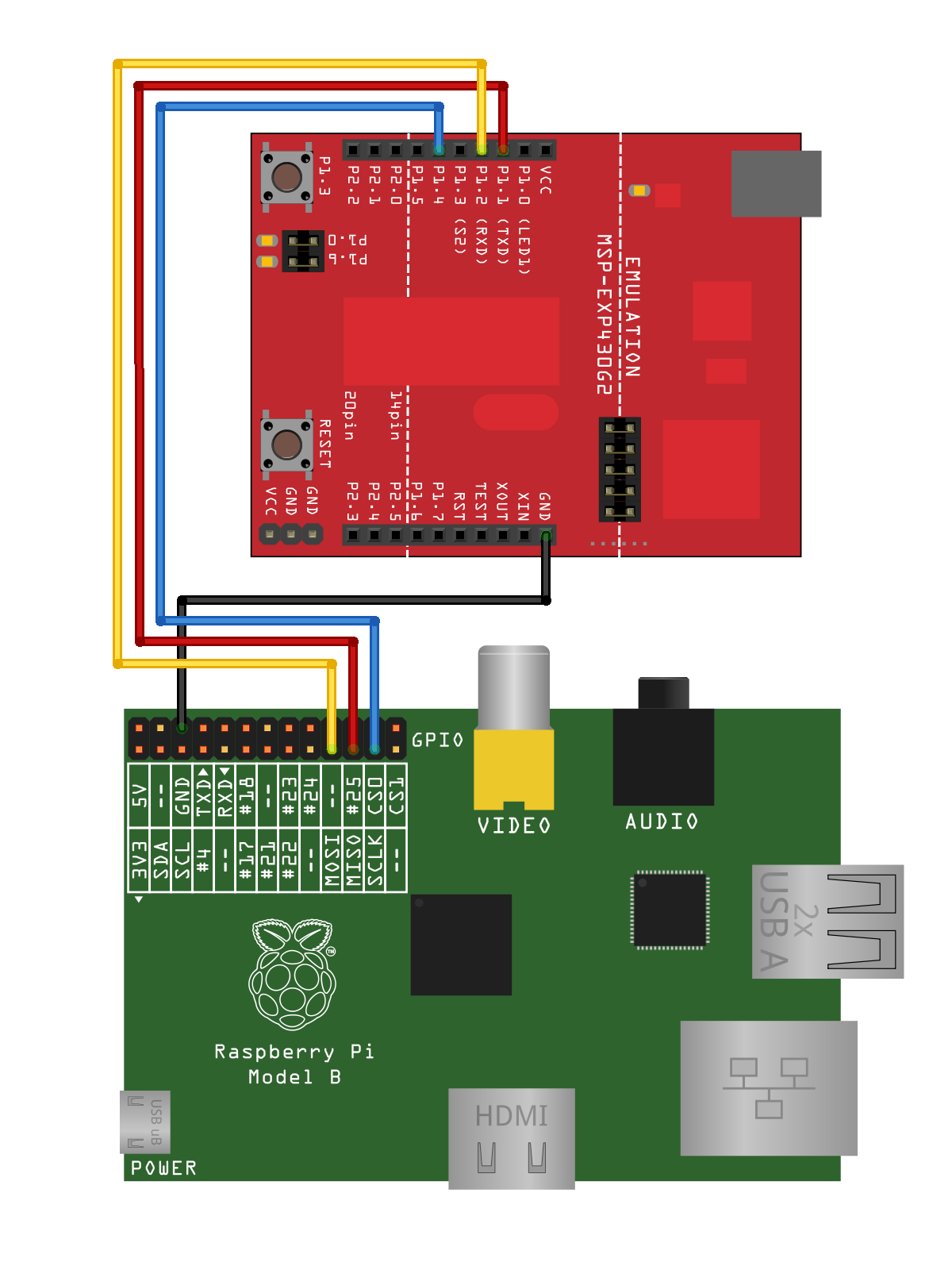
Wiring
MSP430
Flash the below code to your MSP430 chip. Please see this tutorial for information on compiling and programming your MSP430.
MSP430 Code
//******************************************************************************
// MSP430G2xx3 Demo - USCI_A0, SPI 3-Wire Slave Data Echo
//
// Description: SPI slave talks to SPI master using 3-wire mode. Data received
// from master is echoed back. USCI RX ISR is used to handle communication,
// CPU normally in LPM4. Prior to initial data exchange, master pulses
// slaves RST for complete reset.
// ACLK = n/a, MCLK = SMCLK = DCO ~1.2MHz
//
// Use with SPI Master Incremented Data code example. If the slave is in
// debug mode, the reset signal from the master will conflict with slave's
// JTAG; to work around, use IAR's "Release JTAG on Go" on slave device. If
// breakpoints are set in slave RX ISR, master must stopped also to avoid
// overrunning slave RXBUF.
//
// MSP430G2xx3
// -----------------
// /|\| XIN|-
// | | |
// | | XOUT|-
// Master---+-|RST |
// | P1.2|<- Data Out (UCA0SOMI)
// | |
// | P1.1|-> Data In (UCA0SIMO)
// | |
// | P1.4|<- Serial Clock In (UCA0CLK)
//
// D. Dang
// Texas Instruments Inc.
// February 2011
// Built with CCS Version 4.2.0 and IAR Embedded Workbench Version: 5.10
//******************************************************************************
#include "msp430g2553.h"
#include <string.h>
char cmdbuf[20];
char cmd_index=0;
/** Delay function. **/
void delay(unsigned int d) {
int i;
for (i = 0; i<d; i++) {
nop();
}
}
void flash_spi_detected(void) {
int i=0;
P1OUT = 0;
for (i=0; i < 6; ++i) {
P1OUT = ~P1OUT;
delay(0x4fff);
delay(0x4fff);
}
}
void main(void)
{
WDTCTL = WDTPW + WDTHOLD; // Stop watchdog timer
/* led */
//P1DIR |= BIT0 + BIT5;
P1DIR |= BIT0;
while (P1IN & BIT4); // If clock sig from mstr stays low,
// it is not yet in SPI mode
flash_spi_detected(); // Blink 3 times
P1SEL = BIT1 + BIT2 + BIT4;
P1SEL2 = BIT1 + BIT2 + BIT4;
UCA0CTL1 = UCSWRST; // **Put state machine in reset**
UCA0CTL0 |= UCMSB + UCSYNC; // 3-pin, 8-bit SPI master
UCA0CTL1 &= ~UCSWRST; // **Initialize USCI state machine**
IE2 |= UCA0RXIE; // Enable USCI0 RX interrupt
__bis_SR_register(LPM4_bits + GIE); // Enter LPM4, enable interrupts
}
__attribute__((interrupt(USCIAB0RX_VECTOR))) void USCI0RX_ISR (void)
{
/*
if (UCA0STAT & UCOE) {
P1OUT |= BIT0;
}
*/
char value = UCA0RXBUF;
if (value == '\n') {
if (strncmp(cmdbuf, "HELLO WORLD", 11) == 0) {
P1OUT |= BIT0;
} else {
P1OUT &= ~BIT0;
}
cmd_index = 0;
} else {
cmdbuf[cmd_index] = value;
cmd_index++;
}
}
Raspberry Pi
With your updated rasbian system you should have the drivers that you need. Now it’s time to load them.
modprobe spi_bcm2708
modprobe spidev
Check to be sure the modules loaded:
lsmod
Module Size Used by
spidev 5944 0
spi_bcm2708 5350 0
snd_bcm2835 21681 0
snd_pcm 81170 1 snd_bcm2835
snd_seq 59528 0
snd_timer 21602 2 snd_seq,snd_pcm
snd_seq_device 6924 1 snd_seq
snd 57427 5 snd_seq_device,snd_timer,snd_seq,snd_pcm,snd_bcm2835
snd_page_alloc 5343 1 snd_pcm
i2c_bcm2708 3822 0
Raspberry Pi Code
Save the below code as spidev_test.c on to your Raspberry Pi and compile it
gcc spidev_test.c -o spidev_test
/*
* SPI testing utility (using spidev driver)
*
* Copyright (c) 2007 MontaVista Software, Inc.
* Copyright (c) 2007 Anton Vorontsov <avorontsov@ru.mvista.com>
*
* This program is free software; you can redistribute it and/or modify
* it under the terms of the GNU General Public License as published by
* the Free Software Foundation; either version 2 of the License.
*
* Cross-compile with cross-gcc -I/path/to/cross-kernel/include
*/
#include <stdint.h>
#include <unistd.h>
#include <stdio.h>
#include <stdlib.h>
#include <getopt.h>
#include <fcntl.h>
#include <sys/ioctl.h>
#include <linux/types.h>
#include <linux/spi/spidev.h>
#define ARRAY_SIZE(a) (sizeof(a) / sizeof((a)[0]))
static void pabort(const char *s)
{
perror(s);
abort();
}
static const char *device = "/dev/spidev0.0";
static uint8_t mode;
static uint8_t bits = 8;
static uint32_t speed = 500000;
static uint16_t delay;
static void transfer(int fd)
{
int ret;
uint8_t tx[] = {
0x48, 0x45, 0x4C, 0x4C, 0x4F,
0x20,
0x57, 0x4F, 0x52, 0x4C, 0x44,
0x0A
};
uint8_t rx[ARRAY_SIZE(tx)] = {0, };
struct spi_ioc_transfer tr = {
.tx_buf = (unsigned long)tx,
.rx_buf = (unsigned long)rx,
.len = ARRAY_SIZE(tx),
.delay_usecs = delay,
.speed_hz = speed,
.bits_per_word = bits,
};
ret = ioctl(fd, SPI_IOC_MESSAGE(1), &tr);
if (ret < 1)
pabort("can't send spi message");
/*
for (ret = 0; ret < ARRAY_SIZE(tx); ret++) {
if (!(ret % 6))
puts("");
printf("%.2X ", rx[ret]);
}
puts("");
*/
}
static void print_usage(const char *prog)
{
printf("Usage: %s [-DsbdlHOLC3]\n", prog);
puts(" -D --device device to use (default /dev/spidev1.1)\n"
" -s --speed max speed (Hz)\n"
" -d --delay delay (usec)\n"
" -b --bpw bits per word \n"
" -l --loop loopback\n"
" -H --cpha clock phase\n"
" -O --cpol clock polarity\n"
" -L --lsb least significant bit first\n"
" -C --cs-high chip select active high\n"
" -3 --3wire SI/SO signals shared\n");
exit(1);
}
static void parse_opts(int argc, char *argv[])
{
while (1) {
static const struct option lopts[] = {
{ "device", 1, 0, 'D' },
{ "speed", 1, 0, 's' },
{ "delay", 1, 0, 'd' },
{ "bpw", 1, 0, 'b' },
{ "loop", 0, 0, 'l' },
{ "cpha", 0, 0, 'H' },
{ "cpol", 0, 0, 'O' },
{ "lsb", 0, 0, 'L' },
{ "cs-high", 0, 0, 'C' },
{ "3wire", 0, 0, '3' },
{ "no-cs", 0, 0, 'N' },
{ "ready", 0, 0, 'R' },
{ NULL, 0, 0, 0 },
};
int c;
c = getopt_long(argc, argv, "D:s:d:b:lHOLC3NR", lopts, NULL);
if (c == -1)
break;
switch (c) {
case 'D':
device = optarg;
break;
case 's':
speed = atoi(optarg);
break;
case 'd':
delay = atoi(optarg);
break;
case 'b':
bits = atoi(optarg);
break;
case 'l':
mode |= SPI_LOOP;
break;
case 'H':
mode |= SPI_CPHA;
break;
case 'O':
mode |= SPI_CPOL;
break;
case 'L':
mode |= SPI_LSB_FIRST;
break;
case 'C':
mode |= SPI_CS_HIGH;
break;
case '3':
mode |= SPI_3WIRE;
break;
case 'N':
mode |= SPI_NO_CS;
break;
case 'R':
mode |= SPI_READY;
break;
default:
print_usage(argv[0]);
break;
}
}
}
int main(int argc, char *argv[])
{
int ret = 0;
int fd;
parse_opts(argc, argv);
fd = open(device, O_RDWR);
if (fd < 0)
pabort("can't open device");
/*
* spi mode
*/
ret = ioctl(fd, SPI_IOC_WR_MODE, &mode);
if (ret == -1)
pabort("can't set spi mode");
ret = ioctl(fd, SPI_IOC_RD_MODE, &mode);
if (ret == -1)
pabort("can't get spi mode");
/*
* bits per word
*/
ret = ioctl(fd, SPI_IOC_WR_BITS_PER_WORD, &bits);
if (ret == -1)
pabort("can't set bits per word");
ret = ioctl(fd, SPI_IOC_RD_BITS_PER_WORD, &bits);
if (ret == -1)
pabort("can't get bits per word");
/*
* max speed hz
*/
ret = ioctl(fd, SPI_IOC_WR_MAX_SPEED_HZ, &speed);
if (ret == -1)
pabort("can't set max speed hz");
ret = ioctl(fd, SPI_IOC_RD_MAX_SPEED_HZ, &speed);
if (ret == -1)
pabort("can't get max speed hz");
printf("spi mode: %d\n", mode);
printf("bits per word: %d\n", bits);
printf("max speed: %d Hz (%d KHz)\n", speed, speed/1000);
transfer(fd);
close(fd);
return ret;
}
Running
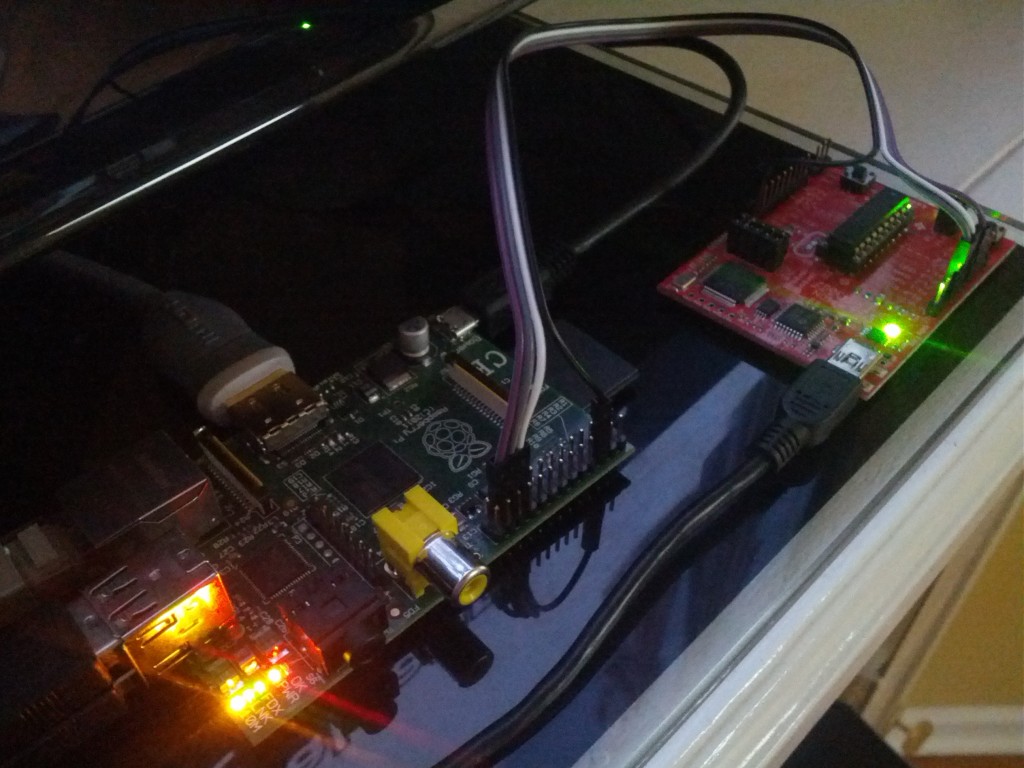
The MSP430 board LED1 will blink 3 times upon recognition of the SPI clock. After this initial sequence, when you SPI data “HELLO WORLD\n” to the MSP430 it will turn on the LED1 light.
On your Raspberry Pi run the previously compiled program. The -s options sets the frequency of the clock when performing the SPI communication.
sudo ./spidev_test -s 120000
Again, a successful sending of “HELLO WORLD\n” will be denoted by LED1 lighting up on the MSP430 board.
Hi! I found the blog looking for “cron” in the Raspberry. I was thinking about connecting one of my Launchpads to the Rasp and… THE NEXT POST WAS THIS! xD
Thanks for posting thi. You, Sir, made my morning.
Any way to daisy-chain multiple MSP430 Launchpads ?
What’s the advantage to connecting the RasPi and the Launchpad this way instead of over USB?
When I copy and paste the MSP430 script I get two errors:
Line 43: nop(); Error: function declared implicitly
Line 78: __attribute__((interrupt(USCIAB0RX_VECTOR))) void USCI0RX_ISR (void) Errors: expected a “{“, unnamed prototype parameters not allowed when body is present, expected a type specifier
I’m REALLY new to CCS and the MSP430. Could you clue me in to what I might be doing wrong?
Thanks.
It looks like the MSP430 code was built with GCC rather than CCS (despite the comment that says “Built with CCS Version 4.2.0″). The syntax used for interrupts and intrinsics varies between compilers.
This is what got it working for me:
Try replacing:
__attribute__((interrupt(USCIAB0RX_VECTOR))) void USCI0RX_ISR(void)
with:
#pragma vector = USCIAB0RX_VECTOR
__interrupt void USCI0RX_ISR(void)
And also replace nop() with _no_operation()
Just a quick note. Don’t go by the comments in the MSP430 code. MOSI is P1.2, and MISO is P1.1. It’s shown reverse of that in the comments. Cost me a couple of hours find out why I was receiving all 0xFF on the SPI slave. Excellent example. Now I can use MSP430 as DAC, and MCP3208 as an ADC for my project. Otherwise, I was thinking of using an Arduino.