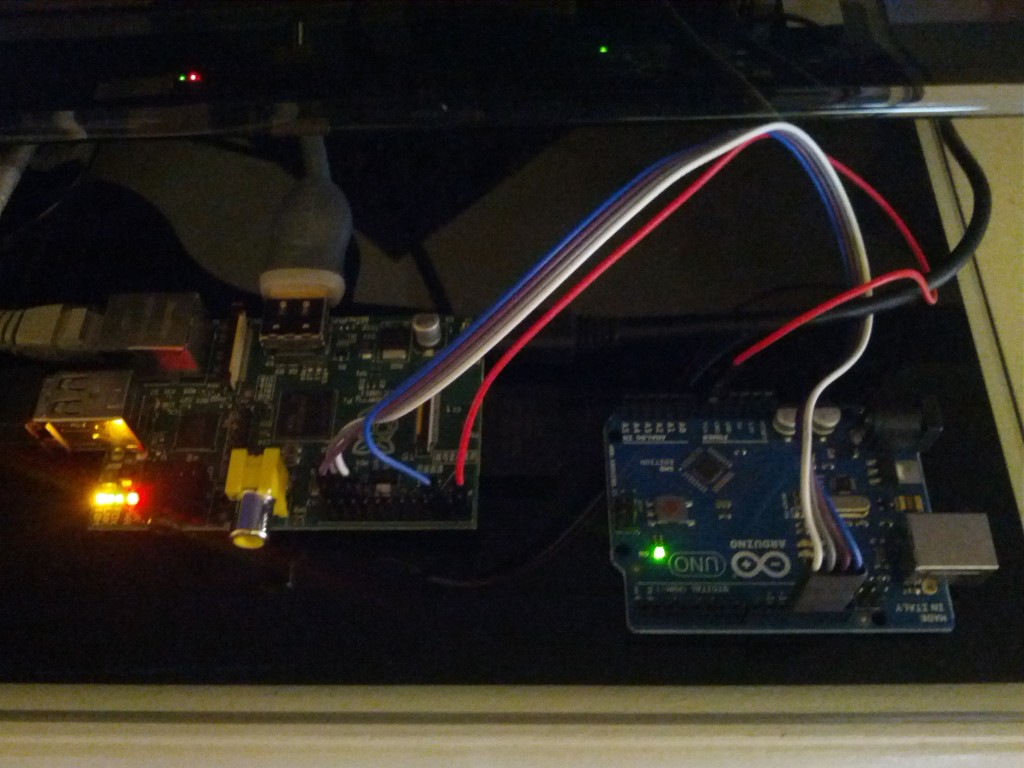
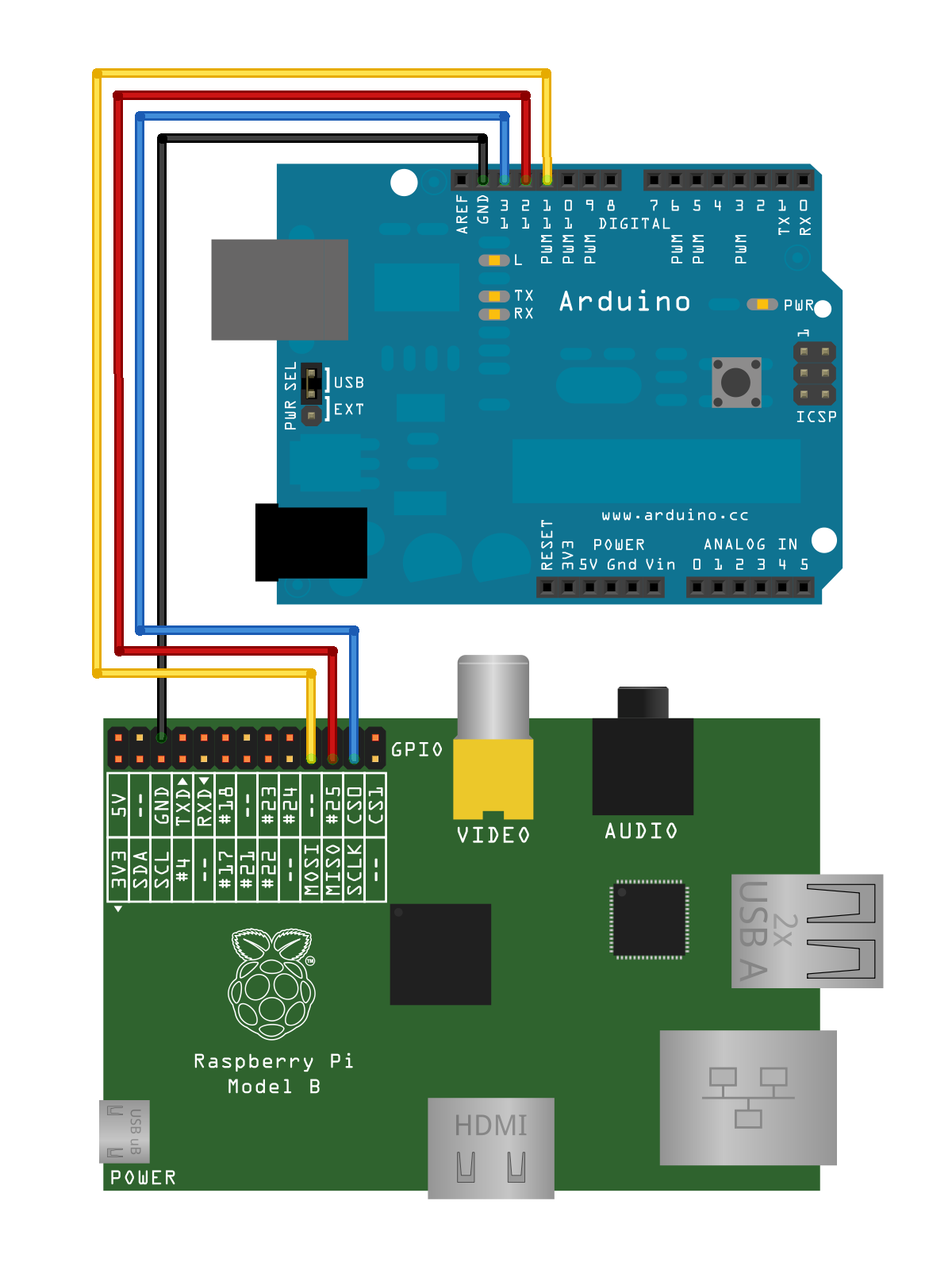
Save the below code as spidev_test.c on to your Raspberry Pi and compile it
gcc spidev_test.c -o spidev_test
Running
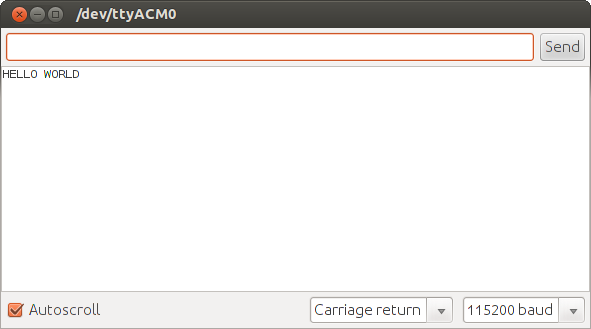
Plug your Arduino to your desktop via the serial cable. Open the arduino Serial Monitor and set the bitrate to 115200. Now, on the Raspberry Pi, run the compiled code
sudo ./spidev_test
You should see HELLO WORLD print in the Arduino IDE Serial Monitor.
Debugging
Make sure that your kernel has the required drivers (spi-bcm2708.ko and spidev.ko)
pi@raspberrypi ~/spi $ ls -al /lib/modules/`uname -r`/kernel/drivers/spi/
total 64
drwxrwxr-x 2 pi pi 4096 Aug 10 10:53 .
drwxrwxr-x 23 pi pi 4096 Aug 10 10:53 ..
-rw-rw-r– 1 pi pi 14428 Aug 10 10:53 spi-bcm2708.ko
-rw-rw-r– 1 pi pi 10852 Aug 10 10:53 spi-bitbang.ko
-rw-rw-r– 1 pi pi 15803 Aug 10 10:53 spidev.ko
-rw-rw-r– 1 pi pi 10693 Aug 10 10:53 spi-gpio.ko
Hmm from http://elinux.org/RPi_Low-level_peripherals “The pins use a 3V3 logic level and are not tolerant of 5V levels, such as you might find on a 5V powered Arduino.”.
Let me try and find out from some friends and colleagues why this works and doesn’t blow up
“Non tolerant” doesn’t mean it will blow up right away, just shorten the Pi’s life span. Use a logic level converter like http://www.adafruit.com/products/395 to supply the right voltage levels.
It would be interesting to learn how the spi-kernel-driver might be used to
read an SPI ADC (e.g. ADS1100). Additionally this would be more save for the hardware, because this ADC works on 2.7 to 5.5V. Where to find more documentation and/or examples using this kernel-driver ? Thank you!
im beginner doing spi interface. i tried with above code to start learning. i connected wires as described but i got o/p “can’t able open device”. one thing which is different from above of mine is the broadcom pheripheral mine is BCM2835. is there any change in the code for my bcm. and one more thing spi may be blacklisted when i google for solution how to unlock them. and not able to find spidev under dev. how to resolve it?
You can observe the blacklisting or not of the spi drivers by following the guide above. Specifically, the lsmod section. Don’t think of blacklisting a driver as locking but rather as a convenience mechanism for specifying that a driver not be loaded when the distribution starts up for one reason or another.
After you have verified the driver is loaded ensure that the driver created the device nodes. Specifically /dev/spidev0.0
two things i want to clarify with you. im sending command byte 0xFE from rpi after its received in arduino im sending {0xAA,0xAB,0xAC} from arduino
1. while transmitting a buffer why its necessary to add 0x0A at the end of the buffer (arduino) when i look at serial monitor it shows 0xAA,0xAB,0xAC “0x0A” 0xAA,0xAB,0xAC if 0x0A is added it sendinding as 0xAA,0x0A,0xAB,0x0A.
2.while receiving in rpi, each received byte in sent buffer follwed by command byte(0xFE) for 9 times. eg: if im receiving in rpi as 0xAA 0xFE 0xFE 0xFE 0xFE 0xFE 0xFE 0xFE 0xFE 0xFE 0xAB…….
I am pretty new to programming. I have a device which I want to connect to the RPi using SPI. I tried out the spi_devtest.c and it works. But the SPI frame of the slave device requires 24 bits. I have searched high and low and have not been able to find a solution. I tried changing the number of bits per word but that does not work. I wonder if I would have to just send 3 bytes instead of 24 bits. In that case, I don’t know how to send 3 bytes without the chip select going inactive after each word. Any help would be greatly appreciated.
TT or anyone. I have the same issue of requiring 24 bits without raising syncb. Do tell how you “figured it out”. Wondering if I can use a different gpio bit and create and control my own sincb, but this seems ugly.
Sorry for taking so long to respond, I ended up just sending 3 8bit words. I don’t know if there’s any other way to do it, or if there exists a better way.
I have some errors while compiling the RasPi code..
They are:
pi@raspberrypi ~ $ gcc spidev_test.c -o spidev_test
spidev_test.c:234:13: error: redefinition of ‘pabort’
spidev_test.c:26:13: note: previous definition of ‘pabort’ was here
spidev_test.c:240:20: error: redefinition of ‘device’
spidev_test.c:32:20: note: previous definition of ‘device’ was here
spidev_test.c:242:16: error: redefinition of ‘bits’
spidev_test.c:34:16: note: previous definition of ‘bits’ was here
spidev_test.c:243:17: error: redefinition of ‘speed’
spidev_test.c:35:17: note: previous definition of ‘speed’ was here
spidev_test.c:246:13: error: redefinition of ‘transfer’
spidev_test.c:38:13: note: previous definition of ‘transfer’ was here
spidev_test.c:279:13: error: redefinition of ‘print_usage’
spidev_test.c:71:13: note: previous definition of ‘print_usage’ was here
spidev_test.c:295:13: error: redefinition of ‘parse_opts’
spidev_test.c:87:13: note: previous definition of ‘parse_opts’ was here
spidev_test.c:364:5: error: redefinition of ‘main’
I got the /dev/spidev0.0 and spidev0.1. The RasPi is updated and everything is ok, except the “pi@raspberrypi ~/spi $ ls -al /lib/modules/`uname -r`/kernel/drivers/spi/” part, where I only get: “total 64″.
Hello,
Great tuto, just may be asking a stupid question but there is no wire with CE0 ou CE1 between the Arduino and the PI, does the arduino hardware SPI work even if the Chip Enable pin is floating ?
Thanks
I get this error: spi_slave.ino: In function ‘void setup()’:
spi_slave:24: error: ‘SPCR’ was not declared in this scope
spi_slave:24: error: ‘SPE’ was not declared in this scope
spi_slave:24: error: ‘_BV’ was not declared in this scope
spi_slave.ino: In function ‘void SPI_STC_vect()’:
spi_slave:39: error: ‘SPDR’ was not declared in this scope
Does anyone know what could be the problem and/or know how to fix this? I’m using this code with the arduino due
Raspberry Piの資料リンク集 « nanoblog - [...] How to use your Raspberry Pi like an Arduino | Limina.Log Raspberry PiとArduinoがSPI通信 Raspberry Pi + Arduino + ...
RaspberryPI: un po di link utili - [...] pi + arduino http://mitchtech.net/raspberry-pi-arduino-spi/ gertboard http://www.raspberrypi.org/archives/tag/gertboardworking WIFI USB DONGLE Tp-Link [...]
Always excercise caution when working with electronics. All software is provided on an "as is" basis without warranty of any kind, express or implied. Unless otherwise noted, all code content is licensed under the Apache 2.0 license
Wow, can the 3.3V RPi tolerate the 5V TTL levels of the Arduino?
Hmm from http://elinux.org/RPi_Low-level_peripherals “The pins use a 3V3 logic level and are not tolerant of 5V levels, such as you might find on a 5V powered Arduino.”.
Let me try and find out from some friends and colleagues why this works and doesn’t blow up
Accidentally put 5V on the GPIO Pins of mine and didn’t blow up either
Put -5V on it and it’s in the heaven now
“Non tolerant” doesn’t mean it will blow up right away, just shorten the Pi’s life span. Use a logic level converter like http://www.adafruit.com/products/395 to supply the right voltage levels.
Many N-Channel Enhancement Mode MOSFETs can also be used for level shifting, some of them costing only the loose change in your back trouser pocket.
It might work only because the example doesn’t send any information from the Arduino back to the Pi and thus putting 5v on the Pi input pin.
First of all thank you for sharing this code!
I am new in this, and i would like to know how can the arduino send back the data received to the raspberry.
Thanks!
I second anjz!
This would be much more useful
I third anjz!
I’m still searching for a way to work this out. The arduino spi lib itself supports only master mode.
Maybe a bus switch from 5V to 3.3V could be useful in order to avoid harming the Raspberry Pi. Something like this: http://www.ti.com/lit/ds/symlink/sn74cbtd3384c.pdf
It would be interesting to learn how the spi-kernel-driver might be used to
read an SPI ADC (e.g. ADS1100). Additionally this would be more save for the hardware, because this ADC works on 2.7 to 5.5V. Where to find more documentation and/or examples using this kernel-driver ? Thank you!
ADS1100 is rather I2C:
http://www.ti.com/lit/ds/symlink/ads1100.pdf
MCP3004/3008 is SPI:
http://www.adafruit.com/datasheets/MCP3008.pdf
im beginner doing spi interface. i tried with above code to start learning. i connected wires as described but i got o/p “can’t able open device”. one thing which is different from above of mine is the broadcom pheripheral mine is BCM2835. is there any change in the code for my bcm. and one more thing spi may be blacklisted when i google for solution how to unlock them. and not able to find spidev under dev. how to resolve it?
You can observe the blacklisting or not of the spi drivers by following the guide above. Specifically, the lsmod section. Don’t think of blacklisting a driver as locking but rather as a convenience mechanism for specifying that a driver not be loaded when the distribution starts up for one reason or another.
After you have verified the driver is loaded ensure that the driver created the device nodes. Specifically /dev/spidev0.0
Let me know if you have further problems.
when i try lsmod, i cant find spidev0.0 how to load it. please guide me. for lsmod i got this
Module Size Used by
evdev 8682 4
joydev 9102 0
snd_bcm2835 12808 0
snd_pcm 74834 1 snd_bcm2835
snd_seq 52536 0
snd_timer 19698 2 snd_seq,snd_pcm
snd_seq_device 6300 1 snd_seq
snd 52489 5 snd_seq_device,snd_timer,snd_seq,snd_pcm,snd_bcm2835
snd_page_alloc 4951 1 snd_pcm
now i got spi enabled
Module Size Used by
snd_bcm2835 12808 0
snd_pcm 74834 1 snd_bcm2835
snd_seq 52536 0
snd_timer 19698 2 snd_seq,snd_pcm
snd_seq_device 6300 1 snd_seq
snd 52489 5 snd_seq_device,snd_timer,snd_seq,snd_pcm,snd_bcm2835
snd_page_alloc 4951 1 snd_pcm
spidev 5136 0
evdev 8682 4
joydev 9102 0
spi_bcm2708 4401 0
and in ls /dev/spi*
/dev/spidev0.0 /dev/spidev0.1
now im getting output
“can’t open device : permission denied”
Try prepending the command you are running with sudo. For example if you are running the command ‘ls’ try ‘sudo ls’.
had u wrote code for receiving data from arduino?
Arduino example spi receiver code is included in The above tutorial.
two things i want to clarify with you. im sending command byte 0xFE from rpi after its received in arduino im sending {0xAA,0xAB,0xAC} from arduino
1. while transmitting a buffer why its necessary to add 0x0A at the end of the buffer (arduino) when i look at serial monitor it shows 0xAA,0xAB,0xAC “0x0A” 0xAA,0xAB,0xAC if 0x0A is added it sendinding as 0xAA,0x0A,0xAB,0x0A.
2.while receiving in rpi, each received byte in sent buffer follwed by command byte(0xFE) for 9 times. eg: if im receiving in rpi as 0xAA 0xFE 0xFE 0xFE 0xFE 0xFE 0xFE 0xFE 0xFE 0xFE 0xAB…….
sorry in 1. if 0x0A is not added it sending as 0xAA,0x0A,0xAB,0x0A.
I am pretty new to programming. I have a device which I want to connect to the RPi using SPI. I tried out the spi_devtest.c and it works. But the SPI frame of the slave device requires 24 bits. I have searched high and low and have not been able to find a solution. I tried changing the number of bits per word but that does not work. I wonder if I would have to just send 3 bytes instead of 24 bits. In that case, I don’t know how to send 3 bytes without the chip select going inactive after each word. Any help would be greatly appreciated.
nevermind. i figured it out. thanks anyways
TT or anyone. I have the same issue of requiring 24 bits without raising syncb. Do tell how you “figured it out”. Wondering if I can use a different gpio bit and create and control my own sincb, but this seems ugly.
Sorry for taking so long to respond, I ended up just sending 3 8bit words. I don’t know if there’s any other way to do it, or if there exists a better way.
why the byte being returned back to rpi which sent to arduino? is any voltage converter required?
Hey,
I have some errors while compiling the RasPi code..
They are:
pi@raspberrypi ~ $ gcc spidev_test.c -o spidev_test
spidev_test.c:234:13: error: redefinition of ‘pabort’
spidev_test.c:26:13: note: previous definition of ‘pabort’ was here
spidev_test.c:240:20: error: redefinition of ‘device’
spidev_test.c:32:20: note: previous definition of ‘device’ was here
spidev_test.c:242:16: error: redefinition of ‘bits’
spidev_test.c:34:16: note: previous definition of ‘bits’ was here
spidev_test.c:243:17: error: redefinition of ‘speed’
spidev_test.c:35:17: note: previous definition of ‘speed’ was here
spidev_test.c:246:13: error: redefinition of ‘transfer’
spidev_test.c:38:13: note: previous definition of ‘transfer’ was here
spidev_test.c:279:13: error: redefinition of ‘print_usage’
spidev_test.c:71:13: note: previous definition of ‘print_usage’ was here
spidev_test.c:295:13: error: redefinition of ‘parse_opts’
spidev_test.c:87:13: note: previous definition of ‘parse_opts’ was here
spidev_test.c:364:5: error: redefinition of ‘main’
I got the /dev/spidev0.0 and spidev0.1. The RasPi is updated and everything is ok, except the “pi@raspberrypi ~/spi $ ls -al /lib/modules/`uname -r`/kernel/drivers/spi/” part, where I only get: “total 64″.
Please, help:)
Hello,
Great tuto, just may be asking a stupid question but there is no wire with CE0 ou CE1 between the Arduino and the PI, does the arduino hardware SPI work even if the Chip Enable pin is floating ?
Thanks
this shows great potential for fast raspi to arduino transfers! what is the fastest this can work?
I get this error: spi_slave.ino: In function ‘void setup()’:
spi_slave:24: error: ‘SPCR’ was not declared in this scope
spi_slave:24: error: ‘SPE’ was not declared in this scope
spi_slave:24: error: ‘_BV’ was not declared in this scope
spi_slave.ino: In function ‘void SPI_STC_vect()’:
spi_slave:39: error: ‘SPDR’ was not declared in this scope
Does anyone know what could be the problem and/or know how to fix this? I’m using this code with the arduino due