Arduino USB HID Keyboard
Turn your Arduino UNO into a USB HID keyboard, and make buttons that do whatever you want. Make it a useful tool, with new buttons for Cut/Copy/Paste or Volume+/Volume-/Mute, or annoy your friends and colleagues by setting the keyboard to perform random keypress after random delays!
The USB HID keyboard conforms to the standard USB specification, so is functional on all modern operating systems. All this is made possible by the use of the Arduino Device Firmware Update (DFU) function.
Arduino Device Firmware Update (DFU)
The Atmega8U2 chip on the Arduino UNO can be programmed directly using the special USB protocol called Device Firmware Update (DFU). This is completely independant of the ‘normal’ method of flashing sketches to the board using the Arduino IDE.
This process is normally used to update the firmware to a more recent version, as explained in the offical Arduino guide, Updating the Atmega8U2 on an Uno or Mega2560 using DFU. Note: If your board is NOT an Arduino UNO SMD you’ll need to solder a 10k resistor (Brown-black-orange) at the back of your board as shown on the Arduino site.
However, in addition to the ability to flash standard USB Serial firmwares, we can also flash alternative firmwares as well. This allows the device to be recognized as many other device types, including keyboard, mouse, joystick, midi device, etc. This is made possible in part to the wonderful open source LUFA (Lightweight USB Framework for AVRs) USB stack, and keyboard HID firmware from Darran.
In this demonstration, we will flash generic USB HID keyboard firmware. The USB HID protocol provides manufactures the generic specifications to interact with nearly every operating system in existence. For more info, check out the USB HID Spec sheet.
Before you start, install the required packages. On Ubuntu and Debain systems, in a terminal run:
sudo apt-get install dfu-programmer dfu-util
For Windows and Mac instructions to install the dfu-programmer tool, consult the official Arduino DFU documentation.
Then download these two firmware files:
The first step is to make sure you are able to flash the standard arduino firmware. This will confirm that the programmer and the environment are both functional. NOTE: There is no chance of ‘bricking’ the device using this method. The Arduino bootloader firmware can always be updated using the DFU protocol!
sudo dfu-programmer at90usb82 erase sudo dfu-programmer at90usb82 flash --debug 1 Arduino-usbserial.hex sudo dfu-programmer at90usb82 reset
Plug cycle the Arduino, then open the Arduino IDE and ensure that you can still upload a sketch. Assuming everything flashes normally, we can move forward with flashing the HID keyboard firmware.
sudo dfu-programmer at90usb82 erase sudo dfu-programmer at90usb82 flash --debug 1 Arduino-keyboard-0.3.hex sudo dfu-programmer at90usb82 reset
NOTE: The Arduino can only be flashed with skectches through the Adruino IDE if the Arduino-usbserial.hex bootloader is active. So, to develop a USB HID device, the process becomes:
Flash Arduino-usbserial.hex bootloader with dfu-programmer (erase/flash/reset)
Plug cycle the Arduino
Flash firmware sketch using Arduino IDE
Plug cycle the Arduino
Flash Arduino-keyboard-0.3.hex bootloader with dfu-programmer (erase/flash/reset)
Test and repeat
Now that you understand how the process works, you can try out some of these keyboard samples. The easiest example is the random keypress with random delays, since it doesn’t require any components connected to the Arduino.
Random Key/Random Delay
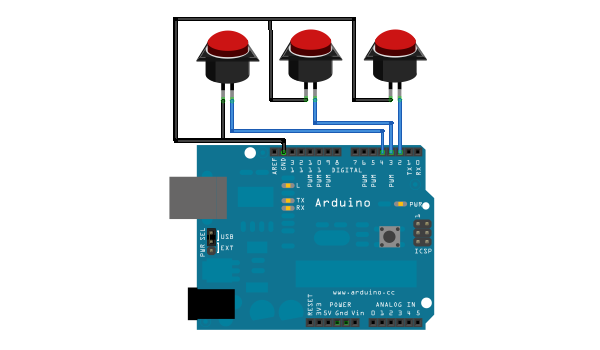
The following two examples both use three buttons connected to the Arduino. The code can easily be changed to make the buttons perform other actions, by consulting the mapping tables in the USB HID documentation. Here is a diagram of the circuit, (created with Fritzing):
Volume+/Volume-/Mute
Cut/Copy/Paste
28 Comments
Trackbacks/Pingbacks
- Arduino USB HID Keyboard | Arduino Passion - [...] link [...]
- Using an Arduino board as a USB keyboard « freetronicsblog - [...] To find out more and learn how it’s done, visit Mitch’s website here. [...]
- MAKE | USB Keyboard Support with the Arduino Uno - [...] Mitchell recently shared his tutorial on how to use DFU Programmer to update the firmware on the Atmega8U2, which, ...
- hello world » Blog Archive » Arduino를 키보드로 사용 - [...] http://mitchtech.net/arduino-usb-hid-keyboard/ Category: arduino | Comment (RSS) | 트랙백 [...]
- USB Keyboard Support with the Arduino Uno / Cooking Hacks Blog - [...] Mitchell recently shared his tutorial on how to use DFU Programmer to update the firmware on the Atmega8U2, which, ...
- USB Keyboard Support with the Arduino Uno - [...] Mitchell recently shared his tutorial on how to use DFU Programmer to update the firmware on the Atmega8U2, which, ...
- Arduino Uno as USB HID keyboard – Part 1 | Doodling With Electrons - [...] went looking for documentation, and found a great post by Michael Mitchell – Arduino USB HID Keyboard. I was ...
- Arduino USB HID Keyboard -- Arduino Passion - [...] link [...]
- L’heure du barbu – podcast Audio – le pilote… « La Grotte Du Barbu - [...] sur HackerLand: le hacking rural - comment démonter un moniteur CRT - la résistance à 0 Ohms - utiliser ...
- Creating a Pinball Game Controller | Fun with DC Circuits (and phones, and robots …) - [...] as a USB HID device. It turns out you can flash the arduino with USB HID firmware, discussed here. That ...
- Arduino | MuuTTa - [...] Pending to do or for the next version * Buttons without resistors using this page [...]
- Arduino and servos | santerifriman - [...] I’ve always wanted to do my own arcade controller and I found that somebody has actually done it with ...
- Transponder XPNDR - [...] arduino card with new firmware, this way I can use it as a HID keyboard. Interesting stuff here: Arduino ...


Neat, I found it easier to flash the 8U2 via an external programmer, but I like that it is possible to do it using a DFU
Hi kirill,
Good to know that this method is functional as well!
I wonder, could the teensyduino add-on be used to upload sketches while the 8U2 is burned with the keyboard hex?
Interesting… I was previously not familiar with the teensyduino add-on. I will give it a try and see if this will work to flash sketches while the keyboard hex firmware is active.
Looks like teensy uses a special proprietary bootloader call HalfKay, instead of DFU. LUFA has a similar HID bootloader that can be used as an alternative, from what I’ve found (http://elasticsheep.com/2010/01/installing-the-lufa-teensyhid-bootloader/).
The hardware/teensy/boards.txt file for the teensyduino addon will need to be edited, and there is no support for a90usb82 in the headers. Could be an involved project to add the capability.
Aww… too bad. This seemed like it would be a more efficient solution to the current awkward development cycle of flashing back and forth to the serial firmware.
Yea, I’m still looking at it. If anything, it would be nice to be able to flash back and forth to the serial firmware from inside the arduino ide.
Really awesome stuff. The sudo “dfu-programmer at90usb82 erase” fails me though, all I get is “dfu-programmer: no device present.”. I can see the my UNO with lsusb … Anyone got any ideas?
If you can see your UNO and *Not* UNO DFU, your ATmega8U2 isnt in DFU mode. Different revisions have different methods to reset into DFU, my UNO R2 only requires a momentary short on pins 5 & 6 of the 8u2′s ISP header.
Zirrus is right. You will only be able to see the UNO in DFU if you have performed the momentary short of the ISP header pins. If you are able to see it from the Adruino IDE (or it is currently running the keyboard firmware and is acting according), then give the momentary short another attempt.
Thanks you two. It is all still a bit strange to me though.
When I short the two ISP pins (reset & gnd) the small LED marked “L” flashes a few times and I can no longer see the UNO from the Arduino IDE.
With lsusb, this is what I get: “Bus 004 Device 010: ID 03eb:2fef Atmel Corp.” – where before the UNO was listed by lsusb without the “Atmel Corp.”-part.
However, I still get the “no device present.” when I try to run the “dfu-programmer at90usb82 erase”-command. Both as root and regular user.
Oh dear
Hello again Bekky. You’re on the right track atleast. You might need to add a rule to udev to have permissions to the device. You can trying running ‘sudo dfu-programmer’ and see if that works OR you can create the file /etc/udev/rules.d/99-dfu-programmer.rules and add the following text:
SUBSYSTEM==”usb”, ACTION==”add”, SYSFS{idVendor}==”03eb”, SYSFS{idProduct}==”2fef”, MODE=”660″, GROUP=”plugdev”, SYMLINK+=”at90usb-%k”
BUS==”usb”, ACTION==”add”, SYSFS{idVendor}==”03eb”, SYSFS{idProduct}==”2fef”, MODE=”660″, GROUP=”plugdev”
Then restart udev with “/etc/init.d/udev restart” This should change the permission so that your user account can touch the device.
I have been using an Uno compatible device called an eleven from Freetronics. I initially had similar issues to you with setting the at90usb82 to DFU mode – The method I found that works best, is too short the two pins(reset and gnd), push the reset button, remove the short (whilst still pressing the button), then release the button – I found that I then got three short flashes from the LED, and was able to send erase using dfu-programmer. Hopefully this may help?
Nice Tutorial – thanks for sharing – It really got my project moving in the right direction. The links are a wealth of information also. Cheers
Hi Michael,
I have loaded the arduino-keyboard hex file on my r3 uno, with a 16u2, and i am able to send any character (a through z) but i cant get the volume up (128) mute (127) or volume down (129) or it seems any thing above 100 to work. page up and down (75 and 78 are working)
my code is :
buf[2] = 127; // Random character
Serial.write(buf, 8); // Send keypress
releaseKey();
any ideas why it wont work? i have spent many hours trying to figure it out, I am using the latest keyboard hex (0.3).
Cheers
Hi Michael,
the keybord software works fine, but when when i put the uno board into a usb-hub bios and windows only see an unknown device. It is so too when i use a power supply.
Any idea?
I have tested this with some hubs
Can you link us to the source code of Arduino-keyboard-0.3.hex please?
The source code for the LUFA firmwares are located on github here: https://github.com/abcminiuser/lufa
Would I be able to use the USB keyboard functionality on another chip, like an ATtiny45? Would I first reflash the Arduino, then use it in that mode to program the ATtiny45? would I need something larger, like an ATmega? or does the Arduino have magic that I just can’t get from one of these chips alone?
http://blog.makezine.com/2011/10/10/how-to-shrinkify-your-arduino-projects/
This is a great project idea but, like all of them, I hate the thought of giving up my Arduino permanently
Hi Michael,
This little ‘toy’ of yours has become an important productive tool for me!
Thank you for documenting this so nicely!
I had bougth a Logitech Touchpad T650, and like many people that commented
on the Logitech website, I find that it lacks gestures e.g. for Switch-to-next-Tab, Close-Tab, Close-window etc.
These missing functions are now provided by a row of leftover Cherry MX keyboard keys at the top end of the T650 served buy the Arduino.
Now I can whizz through tabs like a whirlwind
I have 2 more tips to make the whole thing even more efficient:
1) Your code for the 3 keys still looks ok, but when you have more keys, it makes more sense to take out these 2 lines out of the individual “if” branches to the bottom of the loop
Serial.write(buf, 8); // Send keypress
releaseKey();
2) Because I have to drag the little Arduino out of its tiny Keyboard-Case every time I want to DFU and reprogram it, I have changed the code to send the keycodes for F13 to F24 on the pins, and then using AutoHotKey (look it up in Google) to translate those into the keys&combinations that I really want. This allows also to use the few keys I have there very specific to the application that is active at the moment.
Hi, say I want to send keypress like [CTRL] + [ALT] + [C] to computer via Arduino. What is the way to do it please?
buf[0] is for the modifier keys such as control, shift and alt. You can simulate multiple modifier keys simultaneously pressed by making buf[0]=KEY_LEFT_CTRL+KEY_LEFT_ALT;
Then buf[2]=KEY_C;
When my arduino 2560 is in HID USB keyboard mode, I have to press the reset button before it runs my code. Any idea what is going on here? is it a safe guard of some sort? Will I need to make a reset on boot circuit to get around this or is there another way. Also, is this just me or is it normal behavior?
Other than this niggle it works great and your tutorial made it much easier to set up.
Thanks for the informative post.
I have a quick question, How do you send a long key press?
for an example, long press home button on Android will activate google voice search app?
Hi, I am having trouble installing the DFU programmer, I get libusb0.dll missing when I try to run the program . Anyone have this same problem?
Hello, Im making a product with bitvoicer and and the key setup. I kan se that you buf 2 and then there is a number for the different letters .. i was wondering what the numbers for [a],[s],[d],[w] and/or the arrow keys
??
This is really cool, I would like to use this for a custom keyboard project. But with this new firmware on the Arduino. Since it is using the __factory USB__ port to communicate with PC **as a keyboard**, doesn’t this increase the parts cost? What if you wantted to put this into a product? The cost would go up because instead of a $6 ATmel chip, you now have the cost of $22 arduino development board to? That is was it seems like to me.
Can someone explain the concept of “buf”
Why is V key in buf[2] and ctrl in buf[0]?
buf[0] = KEY_LEFT_CTRL; // Ctrl
buf[2] = 25; // Letter V
Serial.write(buf, 8); // Release key
What determines the buf the various commands should be in?