Android + Arduino + USB Host + Simple Digital Output
Simplest possible digital output with Android and Arduino. This article will discuss the bare minimal requirements for development of an Android USB digital output device. The goal is to demonstrate the easiest possible use of the technology. For additional background information on Android development, Arduino, and MicroBridge, check out these links:
Android Developer’s Guide
Getting Started with Arduino
Microbridge
Getting Started
First, make sure you have setup the development environments for Arduino and Android:
Hardware
Parts needed:
- Android Device (1.6+)
- 3x LED Lights
- 3x 330 ohms resistors
- Breadboard
- Power supply
- Hook-up wire
- Android ADK Board*
- – OR –
- Arduino compatible and USB Host shield
*Supported boards include:
Google ADK board, Freeduino ADK board , Seeed Studio ADK board, and DIY Drones ADK board
Assembly
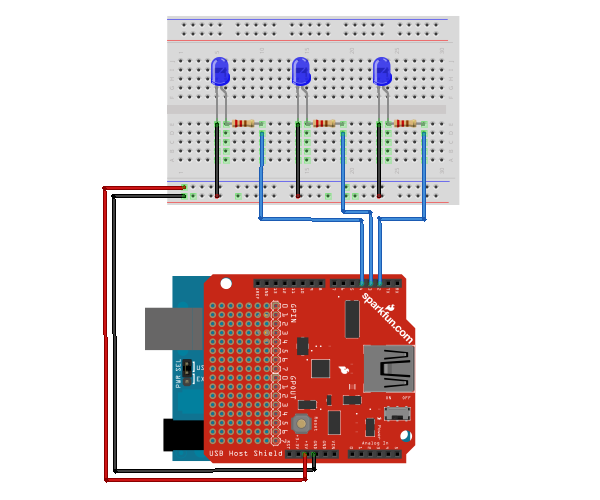
Connect the 330 ohm resistors in series with the anodes of the LEDs to the desired digital output pins, and the cathodes of the LEDs to ground. The example uses digital pins 2, 3, and 4, but can be used with any IO pin that doesn’t interfere with the SPI communication with the USB Host Board. For most boards, these are pins 10 – 14. The resistors, in this case, are being used to prevent current overdraw to the LEDs. Here is a diagram of the completed circuit (created with Fritzing):
Software
Arduino Firmware
Next, upload the Arduino sketch to the microcontroller. The sketch uses the Microbridgeimplementation by Niels Brouwers. Microbridge uses Android Debug Bridge (ABD) forwarding over TCP, rather than the official Google Android ADK. You can checkout the source for the Arduino sketch from Github, or just copy and paste the following into the Arduino IDE.
Android App
Finally, install the Android Demo application onto the device. You can either download the pre-built .apkor checkout the source from Github:
git clone git://github.com/mitchtech/android_adb_simple_digital_output.git
Finally upload the app to the device (or browse to this page on the device and download the apk above). Connect the Android device to the USB Host board/shield, and start up the app.
18 Comments
Trackbacks/Pingbacks
- Android + Arduino + USB Host + Combination Lock | MitchTech - [...] Digital Input Simple Digital Output Simple Analog Input Simple Analog [...]
- Android + Arduino + USB Host + Pan Tilt LEDs | MitchTech - [...] Digital Input Simple Digital Output Simple Analog Input Simple Analog [...]
- Android + Arduino + USB Host + Serial 4 digit LED | MitchTech - [...] Digital Input Simple Digital Output Simple Analog Input Simple Analog [...]


great example i have successfully implemented this example. actually i am making android application in which when phone rings then led blink. i have implemented the phonelistener class it is detecting the state of the phone but its not able to send the byte using this code
try {
// Send the state of each LED to ADK Main Board as a byte
mServer.send(new byte[] { (byte) mLedData1});
} catch (IOException e) {
Log.e(TAG, “problem sending TCP message”, e);
}
i am using the same arduino code that u have used to ledblink using button. can pls help me. i struggling a lot.
I think the Arduino code is not the one for this example? Either way, I made the code on my own and used your Android version. Works like a charm!
Thanks a lot for your guide!
Can you help me ahmed i have some errors in line 18 of the arduino code
connection = ADB::addConnection(“tcp:4568″, true, adbEventHandler);
i don’t what is this error ??
Hi! Did you use the Arduino code on this page? because I’m fairly sure it does not match this example.
Anyways, what does the Arduino say about the error?
I think I know what the error is! When you copy-paste the code into the Arduino IDE, the ‘ ” ‘ & ‘ – ‘ characters are not copied correctly. So you’ll have to rewrite them.
The IDE probably tells you that there’s a stray / error, right?
What arduino version you use ( 1.0.1 or 1.0 or 0.022)?
which library you used ? there are a lot of libraries ??
to know also i am using arduino mega adk …
the error in line 18
connection = ADB::addConnection(“tcp:4568″, true, adbEventHandler);
thanks a lot for your answer ..
Ahmed ,
?
yes there are a stray error
what is the solution
to be specific
how can i change ” – ” written in line 23
if ((millis() – lastTime) > 20)
??????????
Copying and pasting the code directly from the website seemed to grab extra characters, so I have enclosed it within a github gist. It should now work correctly without stray ‘\’s now!
That was indeed the issue, thanks for pointing out the easy fix!
ahmed can you send me the arduino code for this tutorial? thanks
email: richard.pesieto@yahoo.com
\
Hi!
Michael changed code to the one relavant for this example. You can refer to his in case you are using 3 LEDs.
I’ll send you a simpler version which uses only one LED as a proof of operation
Hello.The adb work with usb host shield 2.0 and arduino duemilanove?I try but mine no work.No errors.When put button led application no flash.What libraries i must use the default microbridge?
the code is correct but you need to open de monitor serial in arduino IDE and active the NL&CR so i work myself
i have downloaded android application on mobile and uploaded arduino code there were no errors, but nothing happen and on arduino serial menitor that is error appear “Error: OSCOKIRQ failed to assert”what can i do ?
thanks alot
i have downloaded android code on mobile and upload arduino code on mega there were no erros , but nothing happen and when running arduino serial menitor thar error appear “Error: OSCOKIRQ failed to assert”
what can i do?
thanks
Hi I use Meka2560 ADK i’m download source code burn to board and android device it not error but unusable same VIDEO
hi, I’m new to Arduino.Instead of using the USB shield, i have an Arduino Uno and a bluetooth Wireless TTL Transceiver Module. Is it possible to use the same Arduino sketch and the same apk file to complete this circuit?
I have tried this with an Arduino Mega 2560 ADK… I have used the inbuilt USB of the board to communicate with the Android device…No errors But No output