Android + Arduino + USB Host + Simple Analog Output
Simplest possible analog output with Android and Arduino. This article will discuss the bare minimal requirements for development of an Android USB digital output device, a controllable RGB LED. The goal is to demonstrate the easiest possible use of the technology. For additional background information on Android development, Arduino, and MicroBridge, check out these links:
Android Developer’s Guide
Getting Started with Arduino
Microbridge
Getting Started
First, make sure you have setup the development environments for Arduino and Android:
Hardware
Parts needed:
- Android Device (1.6+)
- RGB LED
- 3x 330 ohms resistors
- Breadboard
- Power supply
- Hook-up wire
- Android ADK Board*
- – OR –
- Arduino compatible and USB Host shield
*Supported boards include:
Google ADK board, Freeduino ADK board , Seeed Studio ADK board, and DIY Drones ADK board
Assembly
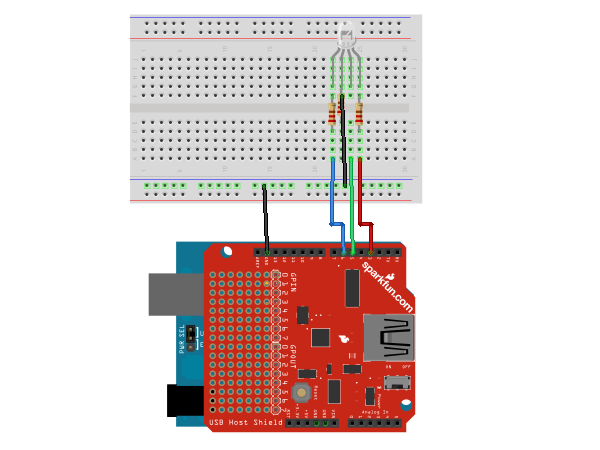
The RGB LED has four leads: the three short ones are anodes that correspond to each of the three colors (red, green, and blue) and the fourth, longer lead is the common cathode. Connect the 330 ohm resistors in series with the anodes of the LED and the common cathode to ground. The example uses pins 3, 5, and 6, but can be used with any PWM pin (usually denoted with a ~ symbol) that doesn’t interfere with the SPI communication with the USB Host Board (usually pins 10 – 14). The resistors, in this case, are being used to prevent current overdraw to the LEDs. Here is a diagram of the completed circuit (created with Fritzing):
Software
Arduino Firmware
Next, upload the Arduino sketch to the microcontroller. The sketch uses the Microbridgeimplementation by Niels Brouwers. Microbridge uses Android Debug Bridge (ABD) forwarding over TCP, rather than the official Google Android ADK. You can checkout the source for the Arduino sketch from Github, or just copy and paste the following into the Arduino IDE.
Android App
Finally, install the Android Demo application onto the device. You can either download the pre-built .apkor checkout the source from Github:
git clone git://github.com/mitchtech/android_adb_simple_analog_output.git
Finally upload the app to the device (or browse to this page on the device and download the apk above). Connect the Android device to the USB Host board/shield, and start up the app.
5 Comments
Trackbacks/Pingbacks
- USB Port programmieren - Seite 4 - Android-Hilfe.de - [...] [...]
- Android + Arduino + USB Host + Temperature + Light | MitchTech - [...] Simple Digital Input Simple Digital Output Simple Analog Input Simple Analog Output [...]
- Android + Arduino + USB Host + Swivel Head Android with LEDs | MitchTech - [...] Simple Digital Input Simple Digital Output Simple Analog Input Simple Analog Output [...]
- Android + Arduino + USB Host + D-Pad | MitchTech - [...] Simple Digital Input Simple Digital Output Simple Analog Input Simple Analog Output [...]
- Android + Arduino + USB Host + Dual Analog Input | MitchTech - [...] Simple Digital Input Simple Digital Output Simple Analog Input Simple Analog Output [...]
- Android + Arduino + USB Host + Sensor Graph | MitchTech - [...] Simple Digital Input Simple Digital Output Simple Analog Input Simple Analog Output [...]


Hello, I copy and pasted the code in the Arduino sketch. By clicking Verify several errors appear:
error: variable or field ‘adbEventHandler’ declared void
error: ‘Connection’ was not declared in this scope
error: ‘connection’ was not declared in this scope
error: ‘adb_eventType’ was not declared in this scope
error: expected primary-expression before ‘length’
error: expected primary-expression before ‘*’ token
error: ‘data’ was not declared in this scope
error: expected constructor, destructor, or type conversion before ‘*’ token
error: variable or field ‘adbEventHandler’ declared void
error: ‘Connection’ was not declared in this scope
error: ‘connection’ was not declared in this scope
error: ‘adb_eventType’ was not declared in this scope
error: expected primary-expression before ‘length’
error: expected primary-expression before ‘*’ token
error: ‘data’ was not declared in this scope
I’m using version 1.01 of arduino.
What am I doing wrong?
Have you installed the Microbridge library? If not, you will need to download the Adb library here and unpack it into the libraries directory of your Arduino installation as described in the Getting Started guide for Microbridge.
I try to make this project exactly same, But It didn’t work =(
I checked parameter data[0], data[1], data[2] using Serial.println() function, that value is keep 0. that value does not change!
so, What should I do? plz help me
Hi Firstly Thank you very much for this work. =) but I have a problem. Im new for this subjects(usb input and output) and Could you u help me please where should i start? Could you suggest a basic and simple document abouth this to me and for new students like me =) My english is poor and i cant understand complex sources. so if u prepare a source or documents for this subjects can u share it please? I want to learnt this subject’s beginning parts. Thank you very very much =)
Hmmm Actually I get something from ur shares. =) I think u use a usb controll board as input or output connector.. Oke so i want to ask something. I want to do a quadcopter. and this copter have 4 motors and this motors have driver cards u know =) can i control this motors speed with this usb control card? what can I do and which control card is for me? and cheap =) I can buy cheaper because Im a student =) Thank youuu =)