Android + Arduino + USB Host + Simple Analog Input
Simplest possible analog input with the ADK. This article will discuss the bare minimal requirements for development of a basic USB input accessory. The goal is to demonstrate the easiest possible use of the technology. For additional background information on Android development, Arduino, and MicroBridge, check out these links:
Getting Started
First, make sure you have setup the development environments for Arduino and Android:
Hardware
Parts needed:
- Android Device (1.6+)
- Photocell
- 10K ohm resistor
- Hook-up wire
- Android ADK Board*
- – OR –
- Arduino compatible and USB Host shield
*Supported boards include:
Google ADK board, Freeduino ADK board , Seeed Studio ADK board, and DIY Drones ADK board
Assembly
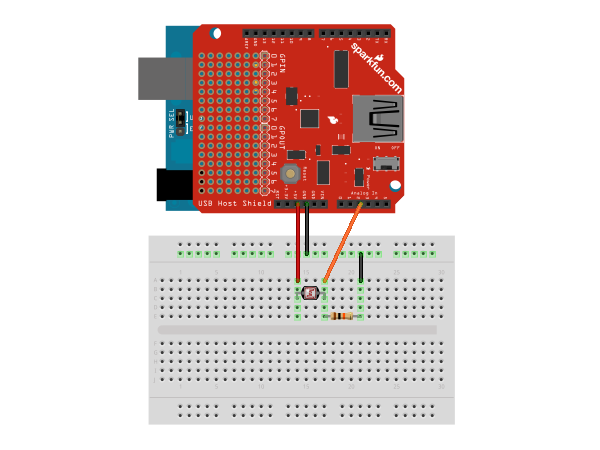
Connect one of the photocell leads to 5v and the other to analog input pin A0. Also connect the same lead through a 10K resistor to ground. In hardware, this concept is known as a voltage divider. Here is a diagram of the completed circuit (created with Fritzing):
Software
Arduino Firmware
Next, upload the Arduino sketch to the microcontroller. The sketch uses the Microbridgeimplementation by Niels Brouwers. Microbridge uses Android Debug Bridge (ABD) forwarding over TCP, rather than the Google Android ADK. You can checkout the source for the Arduino sketch from Github, or just copy and paste the following into the Arduino IDE.
Android App
The next step is to install the Android Demo application onto the device. You can either download the pre-built .apk or checkout the source from Github:
git clone git://github.com/mitchtech/android_adb_simple_analog_input.git
Finally upload the app to the device (or browse to this page on the device and download the apk above). Connect the Android device to the USB Host board/shield, and start up the app.

Android + Arduino + USB Host + Sensor Graph | MitchTech:
June 28th, 2012 at 2:47 am
[...] Digital Input Simple Digital Output Simple Analog Input Simple Analog [...]
Android + Arduino + USB Host + Dual Analog Input | MitchTech:
June 28th, 2012 at 2:48 am
[...] Digital Input Simple Digital Output Simple Analog Input Simple Analog [...]
Android + Arduino + USB Host + D-Pad | MitchTech:
June 28th, 2012 at 2:50 am
[...] Digital Input Simple Digital Output Simple Analog Input Simple Analog [...]
Android + Arduino + USB Host + Swivel Head Android with LEDs | MitchTech:
June 28th, 2012 at 2:51 am
[...] Digital Input Simple Digital Output Simple Analog Input Simple Analog [...]
Android + Arduino + USB Host + Temperature + Light | MitchTech:
June 28th, 2012 at 2:52 am
[...] Digital Input Simple Digital Output Simple Analog Input Simple Analog [...]
kyle kim:
October 13th, 2012 at 3:56 am
this source comes up error message… plz help me
kyle:
October 13th, 2012 at 4:20 am
ADB_Simple_Analog_Input.pde:-1: error: variable or field ‘adbEventHandler’ declared void
ADB_Simple_Analog_Input.pde:-1: error: ‘adb_eventType’ was not declared in this scope
ADB_Simple_Analog_Input.pde:-1: error: expected primary-expression before ‘length’
ADB_Simple_Analog_Input.pde:-1: error: expected constructor, destructor, or type conversion before ‘long’
ADB_Simple_Analog_Input.pde:-1: error: variable or field ‘adbEventHandler’ declared void
ADB_Simple_Analog_Input.pde:-1: error: ‘adb_eventType’ was not declared in this scope
ADB_Simple_Analog_Input.pde:-1: error: expected primary-expression before ‘length’
ADB_Simple_Analog_Input.cpp: In function ‘void setup()’:
ADB_Simple_Analog_Input.pde:-1: error: ‘lastTime’ was not declared in this scope
ADB_Simple_Analog_Input.pde:-1: error: ‘ADB’ has not been declared
ADB_Simple_Analog_Input.pde:-1: error: ‘connection’ was not declared in this scope
ADB_Simple_Analog_Input.pde:-1: error: ‘ADB’ has not been declared
ADB_Simple_Analog_Input.pde:-1: error: ‘adbEventHandler’ was not declared in this scope
ADB_Simple_Analog_Input.cpp: In function ‘void loop()’:
ADB_Simple_Analog_Input.pde:-1: error: ‘lastTime’ was not declared in this scope
ADB_Simple_Analog_Input.pde:-1: error: ‘connection’ was not declared in this scope
ADB_Simple_Analog_Input.pde:-1: error: ‘ADB’ has not been declared
Android + Arduino + USB Host + Pan Tilt LEDs | MitchTech:
October 22nd, 2012 at 1:29 pm
[...] Digital Input Simple Digital Output Simple Analog Input Simple Analog [...]
Android + Arduino + USB Host + Combination Lock | MitchTech:
October 22nd, 2012 at 1:36 pm
[...] Digital Input Simple Digital Output Simple Analog Input Simple Analog [...]
michael:
October 22nd, 2012 at 1:46 pm
Hi Kyle, have you installed the Microbridge library? If not, you will need to download the Adb library here and unpack it into the libraries directory of your Arduino installation as described in the Getting Started guide for Microbridge.
kyle:
November 4th, 2012 at 7:15 am
hi~~
Thanks to your help, I solved this problem.
but i have one more problem….
After uploading cell phone and tried to connect the Arduino board does not operate.
i need your help plz…
michael:
November 4th, 2012 at 2:43 pm
Do you have USB debugging enabled on your Android device? On the device, go to Settings > Applications > Development and enable USB debugging (on an Android 4.0+ device, the setting is located in Settings > Developer options).
ade salau:
March 5th, 2013 at 11:34 am
I get a error message saying boolean does not name a type when uploading